Showing posts with label PLD. Show all posts

Thursday, 23 September 2021

DFI - Day 9

Today was our External Recognition day!

We got to spend our time this morning doing the Google Educator exam and I passed!! It feels great to have sit the exam and test my learning! I think this was a great way to end the DFI. There were a few questions (mainly about google classroom) that I had no idea about but we got there in the end!


This has motivated me to give the level 2 exam a go in the next holidays. I will post the results to my blog after I do that! 

What an amazing 9 weeks! There is so much we have covered and it has been fantastic to have this time to learn, create, and share. I think having the time to try out new things is so important before we try to use them in the classroom. Also, after being in a Manaiakalani school for 3 and a half years it was great to get a better understanding of the Manaikalani pedagogy and kaupapa. 

One of the highlights from DFI for me was working in my digital bubble. I found this time very valuable being in a small group as it was a lot easier to ask questions and learn from each other. Its been great to see everyone grow in confidence throughout this term!

One of the biggest changes going forward is going to be ensuring I make learning as visible as possible. This is now something I really think about when planning and updating my class site. I look forward to reflect on how this is going in the future. 

I am so thankful I was given this opportunity to take part in DFI! It has been a fantastic 9 weeks and I am going to miss this time to focus on my own learning! (although I know my class are looking forward to it being over). 

Thank you Cheryl & Vicki and the rest of the DFI team!

Thursday, 9 September 2021

DFI week 7

Today was our 7th day of DFI! Crazy that we are already this far through the term. This morning it was great meeting with my digital bubble and talking about our experience going back to school yesterday. It was apparent that everywhere the most important thing was maintaining those relationships with students. 


Ubiquitous - Anytime, anywhere, any pace, anyone! 


Being apart of Manaiakalani has been amazing and put us in a great position going into lockdowns. It has meant that our students are able to connect with us and their learning is visible on our class sites. This really shows the importance of rewindable learning! 

Summer learning journey - this is something I have tried to get students involved with in the past but not a lot have taken on this opportunity. I will really try to encourage my students this year as I can see the amazing potential of taking part in this programme. The statistics coming from this programme are really impressive and I think I would like to share some of these with my students when explaining it later this year. 

Cybersmart - In our year of being apart of Manaiakalani I was lucky enough to have Vicki come into my class once a week to model cybersmart lessons for me. This was great PD and I learned a lot from this experience. It is great that all the students in our cluster went through this cybersmart programme so when they come to us at year 7 we can carry on with what they have previously learned. I almost feel that lately I have been slack with focusing on cybersmart so listening to this session this morning has reminded me the importance of these lessons and I am going to think about how to include this in my learning programme more! I have enjoyed setting the cybersmart blog challenges during lockdown and am thankful that these were made available to us. 

"we need to empower them to make smart decisions when online"

Today during our create session I started making a hapara workspace with some key areas of smart learners that I feel like I need to spent time on with my class. I will start the first one next week and will update how it goes.


Digital Dig - Today we got to spend time in our digital bubble working on a digital dig. I can see the importance of doing something like this with students to ensure they know how to use their chromebook! As a teaching it is important I know how to do these things on a chromebook too. I always struggle with the screenshot on the chromebook because I always forget. Lucky I have some amazing experts in my class that are happy to help. Check out my digital dig below (may not be completely finished as I did not have a chromebook to work from).


Explain everything - Today we got to have a look at explain everything which is a tool used in junior schools on ipads. We don't have any ipads in our school but it was good to check out this tool and how to use it. My nephew uses an ipad at his school in Australia and he loves showing me all of the things he had been doing in class with explain everything! Below is my attempt at having a play around on the web version. I think it would be a lot smoother on an ipad but it was great to give it a go. 


Reflecting on the Kaupapa of the Manaiakalani Programme in light of COVID 19 , whether you did Lockdown: Season 1 or Seasons 2/3/4, and YOUR readiness for ubiquitous learning...

  • What are you proud of? I was proud of my students and how willing they are to adapt to the challenges of online learning! I am also feeling good about my class site and how far I have come with the work I am sharing on here.

  • What do you regret? I think the thing I regret was maybe thinking we wouldn't go into lockdown again so I didn't take the time to prepare my students for online learning. We talked about different ways we can prepare students for online learning in the classroom - practice google meets, exploring our class site and doing something like a class site scavenger hunt.

  • What have you taken forward into the ‘new’ era of schooling? Going forward I am going to plan how I make the learning that takes part in our classroom more visible on our class site. This is something to think about going into next term! Lets so what I create!


How are you using rewindable learning to support


1. Young people with learning needs? Something I am enjoying using is Mote records on all of my tasks I put onto my class site. I have a number of students who struggle with reading and often get stuck when I can't read a task to them. Mote has meant that I am able to record myself explaining a task to students and there is no longer this barrier.


2. Diversity, groups, wide range of abilities? With my year 9s I have been making slideshows with videos and screenshots of the learning we have been doing during lockdown and then sharing this on my class site. This is giving students the opportunity to go back and view these lessons again when they need it and in the own pace.


How did you support your learners for these days when you knew you were going to be absent (ie at DFI)? Thinking about when I first started teaching and setting relief was such a mission. It was often busy work, follow on tasks or one of tasks to fill the day. Now I am able to leave students work as if I was there. I can make videos and post on my class site and students can access everything they need!


What COULD you have done from the beginning if you knew what you know now? I think one of the most important things for me is just building my confidence to put myself out there and create videos/rewindable learning for my students. I hate hearing my own voice or watching my own videos but they are so valuable for our students!


What digital tools could you make more use of? One tool I have really enjoyed recently is jamboard! I really want to continue using this in my learning programme in the future. I also feel I know have a lot more skills in using google slides and drawings that I can use within my future learning programmes.


Here is an example of one of the tasks I created during lockdown.


Overall this was another great day at DFI! Its exciting thinking about the google exam coming up. I can't believe we only have 2 more weeks, it is going so fast and I am really enjoying having this time to learn and be creative with the support from the facilitators.

Thursday, 2 September 2021

DFI Week 6

This weeks session was all about google sites! Its good to continue building my understanding of the importance of visible sites and seeing lots of different examples.

It is important that google sites are visible for students and Whanau. Because the learning is visible on our sites it has meant students have been able to continue with their learning during lockdown. I have had feedback from parents that they have enjoyed being able to go through my class site and see what we are doing in class. My next goal is to keep adding rewindable learning to my class site. I need 

One of my Goals for this session was to get my students blogs linked on my class site. This was something I started just before lockdown on a google drawing but never actually linked the blogs to it. I created the template below and got students to decorate a text box each with their name (its still a work in progress as you can see). Today I linked all their individual blogs to each box so now you can click on the name to access the blog. This is going to make commenting on each others blogs a lot easier! Check it out here.


Cheryl when shared with me a way another teacher is making her students more accountable of the work they are posting on their blog and making sure they are commenting on each others blogs. I am going to use the template to create one for my class and give it a go. I will update how this is going in a a few weeks after I introduce it to my class.

My next goal was to add some buttons to my class site. I have had buttons on my home page before but went back to have the tabs across the top. This just seemed to work better for me and my students. But maybe I will try again some day.

In saying that I did today create buttons for my mathematics page. Making this look a whole lot better! I'm still trying to figure out what colour I want the background but for now I will keep it as the default theme one. I also created a banner at the top! Check out these screenshots of the before and after.

Before

After

Or maybe in pink?

Kate from my bubble also showed us how to add an announcement to our class sites too. This is where you can write daily/weekly announcements and it will show up at the top of your site. You can also change the colour and choose if you want it to be on every page or just the home page of your site.


Overall I had a great day being creative and having time to have a play around with my google site! I am already thinking about what buttons I am going to create next! 

Thursday, 26 August 2021

DFI Day 5

Visible teaching and learning - the idea of can we see it? or can we not? Important this is about teaching and learning. We need to think about - Is it visible to the learners? Is it visible to the Whanau? Is it visible to the teacher? Is it visible to colleagues?

We need to think about when is it truly necessary to have stuff password protected. We want our students and Whanau to be able to access our teaching and learning without barriers. One of the helpful tips I got from Vicki previously is make the folder assessable for everyone so when you create documents in the folder you don't have to share again. 

I still don't have a lot of parents that make comments on blogs but it is something we are working on. Going into lockdown has made the visibility of teaching and learning even more important. I have had a few comments during lockdown from parents that they have had a good look at our class site and like how students can carry on with work as if they were at school.

One of the things I am still working on is creating videos of teaching to share on my site. This is quite out of my comfort zone but I am finding students are engaging well with this. It has meant when I am away they can continue with their work and they can work from home. 


Multimodal - delivering communication to people in a way that interests them and suits them. We want to design a class site that is accessible for all of our learners. This can help students become self directed. 

Leveraging up - Multiple texts through multiple modes. Exposing students to a whole range of texts and different. Gives students the opportunity to be critical thinkers (something I am currently working on with my students).
We are able to improve students' understanding for;
- Different perspectives and points of view
- Discern levels of credibility and reliability (really important!!)
- Different 'types' of texts - written, audio, visual, symbolic, etc


This has been an area I have really on just started to look into. We have done 1 off multimodal tasks for students but I really want to make this much more common within my teaching programme. I really like how we were shared the multi-text database and can see the value of this. I want this to be a focus for the near future in my planning. I look forward to continue exploring different ways that teachers set this up for students (again another amazing thing of everyone's sites being visible!!).


Kerry also spoke about recreating a new site each year and seeing how much these develop over the years. This got me really curious to go have a look at my sites from previous years. I have been using google sites since I started teaching in 2016 (back in the old sites days). It was great to go back and see how my sites have developed over the years. Some things I noticed - I have a lot more of my teaching/learning visible, I have changed the way I have my learning planner (I have written straight onto sites, used calendars, used google sheets, and the last couple of years I have been using google slides). Its amazing how much google sites have changed since I have been using them, they are always adding more options which is exciting! There are so many possibilities!

Google sites

Today we have gone over the basics for creating a site again. I found this very helpful as I am often one of the people in my school who helps others when they need assistance in creating their sites. Tips - making sure that you use the year in your site URL so you know what year it is from. 

We also got the time to start creating our own multimodal sites. I started 2 (because I kept changing my mind on what I wanted to create and had a really good idea related to next term). I started with an ANZAC day site - check it out here but keep in mind it is still a work in progress. 

I plan on using this next year so will continue to work on. So far I have really only added in videos and texts but will work on some tasks to complete with these. The other site I started to create is to do with our health topic for next term which is focused on getting active. This was sparked by looking through the multimodal text data base that was shared with us and one related to walking/getting active. I will continue to work on this site too and use it as a way to introduce our topic next term.

Overall another very enjoyable day on DFI! I am getting so much out of being part of this PLD and really enjoy working with my bubble. I can also see the benefit in using multimodal texts! I am looking forward to seeing how much students engage with these. Can't wait for next week.

Thursday, 19 August 2021

DFI 4 - Sharing and working with data

Today was Day 4 of DFI, also our first one in lockdown. DFI was moved to online last year because of the lockdowns. I think it is great being able to connect with teachers from all around the country for DFI so really enjoy having it online. Also very evident is the importance of the skills we are learning with the potential of lockdown being extended.


Sharing

The ability to share and connect with other people is so important. Using blogger students have share with a much wider audience that they previously could. 

There were many reasons why blogger was chosen as the platform for students to use to share their learning. I actually remember using blogger as a year 8 student and how exciting it was seeing each others posts.


Some of the things we do in my class

- Having blogs shared with Whanau 

- Tuhi Mai Tuhi Atu

- Commenting on other students without our school blogs (students love this!)

One thing that I need to work on is not just using blogs to share 'finished/final' version of work. Students can use it as a way of getting feed-forward from others. I also need to get students to start replying to the comments they get. 


Google forms

I love google forms. They are something I have been teaching myself how to use for a while so it was good to have a focus session on using google forms. There are a lot of different settings with google forms that I have not explored yet. So I will be able to have a good look at these in the future. I did really like how people use google forms to do spelling tests and can see how good this would be!


I have also created another form my students to fill out while in lockdown, just so they can check in with me each day and I can get a sense of how they are feeling or if they have any questions.


Google My Maps

I have used google my maps with my students before but today I learned so much more about my maps! I did not know you could import spreadsheets which is really handy to know,  I will think about how I can use this in class. Here is a quick google my map I created with places around my town. 


Google Sheets

Filter options - There are a lot of filters that you can use to sort data. I had a play around with this and can already see how I can use this to look at data differently!! (and a lot easier to sort that manually). I would like to keep working on how I use sheets for my assessment data in the future. 


We also looked at using sheets to do an analysis of blog posts. We watched a lovely video of a student doing this with her blog pots. 

Here is the example I made using data from one of my students blog posts. I really liked this! We are currently doing statistics in mathematics and I think I will use this as one of my tasks for next week! Will also be a great way to show students what their blogging stats look like.


Quality blog comments

Its important that students have a framework when commenting on blogs. Below is one about writing quality blog comments. I will be showing this to my students again and talking through it with them. I think this is something that constantly needs to be revisited with students as they often forget what a quality blog comment should look like.


Overall another great day of learning. It will be good to be a bit more creative over the next couple of weeks with my students. 

Thursday, 12 August 2021

DFI Day 3 - Media/Create

Manaiakalani pedagogy - Create


Creative skills help students become better problem solvers, communicators, and collaborators.


I really liked the quote “Creativity is not to be confused with talent, skill, or intelligence. Creativity is not about doing something better than others, it is about thinking, exploring, discovering, and imagining” (Kohl, 2008). I think it's really important that we encourage our students to be creative and that they know anyone can be creative! I find that giving the students the change to be creative is a great way to get them engaged in learning.


"Not just getting them to use the tools we have - getting them to use them in a creative way"

"We want them to create content, not just sit there and consume."


Something I have been trying to do is give students more choice. For example, we are currently working on novel studies this week. For one of the independent tasks students were given was “create a quiz with questions about the chapters you have read this week”. I did not say how they needed to create this and students choose lots of different ways to do this. I really liked how some students created pick a paths in google slides.


I do realise some students really struggle with this and having too much choice or just having no idea where to start. I found one of the really beneficial things we have done is being apart of Tuhi Mai Tuhi Atu where they have been able to see what other students their age have created. This has really pushed my students further with their creativity.


As we are currently going down the Deep learning path at my school it was good to see how closely this relates with the Manaiakalani pedagogy. 


Fonts


One of the most exciting things from today was being introduced to google fonts and the amazing amount of different fonts available!! I could spend a very long time exploring the different fonts. I am going to choose a couple I really like and start using them with my learning planning etc. I love fonts and am happy to know how easy it is to get new fonts! Also Cheryl showed us the perfect pairings too! Can't wait to keep exploring.


Pick a path 


For our create time today I attended a pick a path workshop. I thought it was relevant because of the work my students created in the last couple of days. Today I created a maths starter for my year 9s to get started on our next unit.

Handy tip - always make sure that you check as you go by going into present mode.


Google drawings

Today we created a blog profile in google drawings. I have now put this on the side of my blog for people to look at when they go onto my blog. Next step make sure every student has one and also make one for my class blog!


 Today we also had the chance to have a play with google drawings and making a cartoon version of a picture. Here is my not so amazing first attempt (this was very challenging). This is something I could see my students loving though! Might be a fun afternoon creative task for them to create a new blog profile picture.


Overall this was another great day of learning! I am looking forward to being more creative with my class.

Thursday, 5 August 2021

DFI week 2 - Workflow

Today was day 2 of DFI - Our focus was workflow.


During our Connecting with Manaiakalani we focused on ‘Learn’. Some of the key ideas I took from this were discussions about effective teaching practice, knowing that we want to do the best for our students.


We were introduced to the acronym RATE. 


Recognising that effective teaching practice, especially in a digital space

Amplify how can we amplify the effective practice

Turbocharge - taking it to the next level

Effective practice - we need to recognise what effective practice is and what it looks like in our school. 


This is something I need to think about more so I am able to turbocharge what we are doing to enhance the learning for our students and make the most out of the digital technology we are lucky to have access to. It's important to know that technology is not just a tool, we need to use it to transform the way we use it to make the most for our students. This led into the next part where we were asked “What does learn look like in your school?”. This is something we are spending quite a bit of time thinking about in our school at the moment. We are currently heading down the path of New Pedagogies for Deep learning, and I am lucky enough to be apart of a lead team in my school. Currently my focus is looking at critical thinking and of the dimensions of this is leveraging digital.


Vicky also touched on the importance of rewindable learning. This is something I am focusing on at the moment, especially with having this one day a week off for DFI. My recent focus has been with my year 9s, ensuring they can continue with the normal class work they would be doing if I was there. The great thing about having the site is being able to have all of the work visible for students. Currently we are working on measurement so I have created recordings using jam board, google castify, and my touch screen laptop to record myself explaining how to find the perimeter, area, and volume of shapes. I have embedded these on my site so students can watch these when they need help. I have had positive feedback from students about this so far which is good because I can't stand the sound of my own voice. Another teacher in my department has also used these videos to share on her site too. This something I really need to push myself to do this more often because it is very worthwhile.


Google apps/tools - Learning for the day


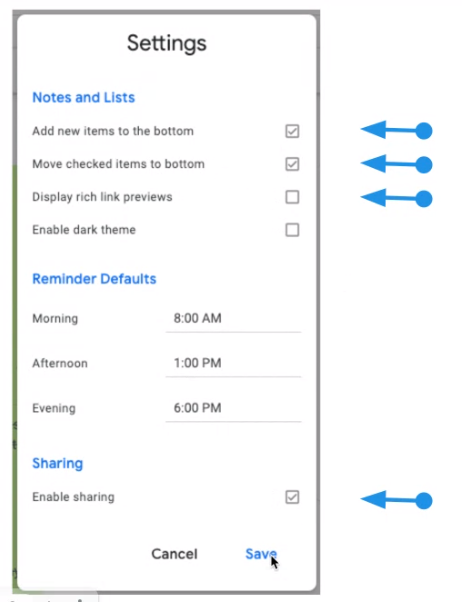
Google keep - note taking, filing, quick thinking. There is a phone version (have been using this for a while for my personal account but not for work) and an extension (will install this as it looks really good and easy to use)


One thing I love about Google keep is how pretty you can make the notes look. I really enjoy personalising slides, sites etc and being able to do this on notes looks great too! 


- Something I have not done before is adding collaborators to a note. Can see how helpful this would be! Will have to think about using this feature in the future.

- I also have not had a good look through the settings looking at reminders etc. Something I will have to look at. 

- Archiving - just pops it into the background, you can access later if needed.

- I also like how you can take a photo and get it converted into text! (one copy of a book and want to use the text etc). I think I will try to use this one out over the next week. I also want to use this for my lists of things I need to do, rather than random post it notes stuck to my laptop.


Gmail

Today I made a signature for my email. You can find this under settings in gmail It was good to learn you can make multiple ones. Here is one I made today.


My handy tip - If you are like me and often have unread emails and don't like having the unread emails at the top and want to sort them out you can search in the search mail bar "label:unread category:primary". This will show you all of your unread emails in your primary category. You can do this with any tabs by changing the word after category.

Calender

Something to use - Shortcut keys to change the view. This is so handy to know! Will save a bit of time!
d - day, t - today, w - week, y - year, m - month


Tabs 


Well, I am definitely a tab collector. You know its bad when you open a new window so you can have less, rather than closing the ones you already have. I already use bookmarks, although Its probably time to sort out my bookmarks again... I will put that on my to do list. I also need to spend some time looking at the different ways I can organise my tabs a lot better, which will help me stop feeling so cluttered while I am working. There are also some cool extensions to help with this too. This is my job over the next week. 


Create

Today for our create tasks we looked at using google meet to record and then using this recording to embed into our blogs. Its important to know that when you create a google meet recording it will automatically save into your drive under meet recordings (it may take a bit of time to show up depending on how long the recording is). 

How to embed a video on blogger
- Find recording in google drive
- Open in new window
- Embed item
- Copy the link
- Past into blog post under html view

Here is my google meet record I made today with Kate from my DFI bubble


Overall this was another great day of learning! I really enjoy the structure of the day - learning in a large group then having a time to practice what we have been learning in our small groups. There are lots of new skills I will take away from today. I really look forward to next weeks one! 

Thursday, 29 July 2021

DFI Week 1 Reflection

Today was the first day of the one Digital Fluency Intensive. This involves 40+ teachers from around the New Zealand.

The morning started learning about Manaiakalani and its origin story and the journey they have been on since. Its very valuable learning more about why Manaiakalani was started and how the community were able to work together because they wanted to do better for their children. I think this is important because we all want to do better for our students and being apart of this DFI is going to help me learn a lot of new skills to use within my classroom.

Some of the key points of the why

- They knew that the digital world was hooking young people and that this needed to be harnessed. It was a way to grab the attention of learners because they were already interested.
- They could see the potential in this and wanted students to be content creatures and be able to share their learning.
- Equity! They needed to make sure that everyone in the community had access, its important that no one is left behind.
- They wanted to focus on the fact that achievement is much bigger than test scores.


Today I was also able to revise a range of skills for using google drive/docs and even learned some new skills!

- You can add a bookmark by dragging the padlock down to the bookmark bar (this one is exciting)

- How to check the groups you are in and change settings etc

- How to use headings in google docs

- Getting students to practice their reading fluency with the voice to text tool

- Control + Number to switch between tabs (only the first 9)

- How to set up workspaces in the priority tab of google drive (this is something I want to do over the next week to help save time).


We also got some time to be creative and design something on google docs using a table. I choose to create a talk moves poster for my class that we can refer to during mathematics. I used remove.bg to remove the backgrounds of the pictures that I have added onto my poster. Having more confidence in being creative will help me model to students some of the possibilities of what they can create. Although I am constantly learning from them!

Here is my poster


Overall I had a great day full of lots of learning. It was great getting to work in digital bubbles, with just a small group of others. I feel like this time will be very valuable. I am really looking forward to next weeks session to continue building on what we started today and learn more about Manaiakalani and the 'learn, create, share' pedagogy over the next 8 weeks!